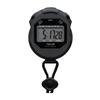
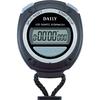
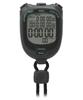
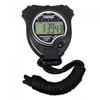
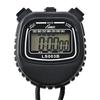
Yüksek Hassasiyetli 1/100 Saniye Zaman Tutma: Bu kronometre, her anı hassasiyetle yakalamanızı sağlayan 1/100 saniye zaman tutma teknolojisine sahiptir.. Koşuyor, bisiklete biniyor, yüzüyor veya herhangi bir sporla uğraşıyor olun, üstün doğruluk sağlar ve bir saniyesini bile kaçırmamanızı garantiler. [Not: Saatiniz periyodik sesler çıkarıyorsa, alarm modunda olabilir. Bu mod, her iki tuşa da basılı tutularak kapatılabilir.
Dayanıklı ve suya dayanıklı tasarım: Yüksek mukavemetli plastik dış yüzey darbelere dayanıklıdır ve yoğun egzersiz sırasında bile şeklini korur.. İçindeki su geçirmez kauçuk conta, terin sızmasını önleyerek her ortamda güvenle kullanmanızı sağlar.
Kompakt ve taşınabilir: Kompakt tasarımı ve pratik kayışı, boynunuza asarak kolayca taşımanızı sağlar, bu da onu spor sırasında hızlı ölçümler için ideal hale getirir.
[Geri Sayım Zamanlayıcı Modu] 1. Spor saatini kronometre moduna geçirmek için MODE düğmesine basın. 2. Ekran [0] değilse, ölçümü durdurmak için BAŞLAT düğmesine basın, ardından sıfırlamak için AYAR düğmesine basın.. 3. Ölçümü başlatmak için BAŞLAT düğmesine tekrar basın, ardından durdurmak için aynı düğmeye basın.. 4. Sıfırlamak için SET düğmesine basın. [Çift Sayım Zamanlayıcı Modu] 1. Ölçümü başlatmak için BAŞLAT düğmesine basın. 2. İlk ölçüm süresini kaydetmek için SET düğmesine basın (ilk ölçüm sırasında normal saat göstergesi duracaktır). 3. İlk ölçüme ekleme yaparak ölçüme devam etmek için SET düğmesine tekrar basın (çift ölçüm modunda, SET düğmesine iki kez basın). 4. Ölçümü durdurmak için BAŞLAT düğmesine basın, ardından sıfırlamak için AYAR düğmesine basın.. [Çift Sayım Zamanlayıcı Ekranı] 1. Ölçümü başlatmak için BAŞLAT düğmesine basın, ardından ilk ölçüm süresini görüntülemek için AYAR düğmesine basın.. 2. Ölçümü durdurmak için BAŞLAT düğmesine tekrar basın, ardından saniyeleri görüntülemek için AYAR düğmesine basın ve ardından sıfırlamak için AYAR düğmesine tekrar basın.
[Saat, Takvim, Haftanın Günü Göstergesi ve Alarm Ayarı] 1. Normal zaman tutma moduna dönmek için MODE tuşuna basın, ardından ay, tarih ve haftanın gününü göstermek için START tuşuna basın.. 2. Alarm saatini görüntülemek için SET düğmesine basın. Alarımı açmak için BAŞLAT düğmesini basılı tutun (zil) açma veya kapatma. [Saat ve Tarih Ayarı] 1. Normal zaman tutma modunda, MODE düğmesine üç kez basın. Saniyeler ve haftanın günü yanıp sönecek ve ayar moduna gireceksiniz. 2. Değeri ayarlamak için BAŞLAT düğmesine basın (hızlı ayarlamalar için basılı tutun), ardından [saniye → dakika → saat → ay → gün → haftanın günü] arasında geçiş yapmak için SET düğmesine tekrar tekrar basın. - 12 saatlik format (AP): A = Sabah, P = Akşam. - 24 saat biçimi (H) Ayrıca desteklenmektedir. Ayarladıktan sonra normal saat tutma moduna dönmek için MODE düğmesine basın.. [Alarm Saati Ayarı] 1. Normal saat tutma modunda, MODE düğmesine iki kez basın. Saat ve tarih yanıp sönecek ve alarm ayarlama moduna gireceksiniz.. 2. [saat → dakika] seçmek için SET düğmesini ve ardından değeri ayarlamak için START düğmesini kullanın. 3. Normal saat ayarlama moduna dönmek için MODE düğmesine basın.
![JetWave [Hakemler Tarafından Önerilen] 0,01 Saniye Hassasiyetli 9 İnç Su Geçirmez Kronometre, Kayış Dahil, Spor, Yemek Pişirme ve İçin Kompakt ve Taşınabilir](https://img.joomcdn.net/4bae766da24f547174dcb9d0a938443ead68fefc_original.jpeg)
![JetWave [Hakemler Tarafından Önerilen] 0,01 Saniye Hassasiyetli 9 İnç Su Geçirmez Kronometre, Kayış Dahil, Spor, Yemek Pişirme ve İçin Kompakt ve Taşınabilir](https://img.joomcdn.net/7786eeb749b270ddcd29580d5649170b6290eb5f_819_1024.jpeg)
![JetWave [Hakemler Tarafından Önerilen] 0,01 Saniye Hassasiyetli 9 İnç Su Geçirmez Kronometre, Kayış Dahil, Spor, Yemek Pişirme ve İçin Kompakt ve Taşınabilir](https://img.joomcdn.net/371c69f6d1493fba0d7fa5c31ff78f667e98dc4c_819_1024.jpeg)
![JetWave [Hakemler Tarafından Önerilen] 0,01 Saniye Hassasiyetli 9 İnç Su Geçirmez Kronometre, Kayış Dahil, Spor, Yemek Pişirme ve İçin Kompakt ve Taşınabilir](https://img.joomcdn.net/80140a5b537d3aaf26df44d4fb0de797c9d057dd_819_1024.jpeg)
![JetWave [Hakemler Tarafından Önerilen] 0,01 Saniye Hassasiyetli 9 İnç Su Geçirmez Kronometre, Kayış Dahil, Spor, Yemek Pişirme ve İçin Kompakt ve Taşınabilir](https://img.joomcdn.net/b682d8840874ed7190b0c6a900ca2c13b9ac9bfd_819_1024.jpeg)
![JetWave [Hakemler Tarafından Önerilen] 0,01 Saniye Hassasiyetli 9 İnç Su Geçirmez Kronometre, Kayış Dahil, Spor, Yemek Pişirme ve İçin Kompakt ve Taşınabilir](https://img.joomcdn.net/b37699d95b548342bed7d60d58223a79022855d3_819_1024.jpeg)


 Teslim edilmediğinde para iadesi