------------------------------------------------------------------------------------------------------------------
Japon Mağazasına Hoş Geldiniz
%100 orijinaldir.
Lütfen satın almadan önce boyut, durum ve aksesuarlar hakkında bilgi alınız.
[Voltaj Uyumluluğu]
Elektrikli cihazları kullanırken, bunların Japon voltaj özelliklerine göre tasarlandığını lütfen unutmayın. (90-110V), bu nedenle farklı bir voltajda kullanırsanız arızaya neden olabilir.
【Fiş Tipi】
Ürünlerimizde Japon fiş tipleri kullanılmaktadır (A veya B tipi).
Gerekirse dönüştürücü adaptör kullanın.
【Transformatörler ve Adaptörler Hakkında Önemli Not】
Bir transformatör, cihazınızın gereksinimlerine uyacak şekilde voltajı ayarlar.
Dönüştürücü adaptör sadece fişin şeklini değiştirir, voltajı ayarlamaz.
Sadece dönüştürücü adaptör kullanılması durumunda transformatör kullanılmadan ürüne zarar verilebilir.
【Yükümlülük】
Ürünün trafosuz çalıştırılması gibi uygunsuz kullanım sonucu meydana gelen arıza ve hasarlardan sorumlu değiliz.
------------------------------------------------------------------------------------------------------------------
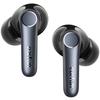
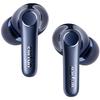
🏅 [Gelişmiş Teknoloji Çözümü ve aptX Kayıpsız Ses İletimi] EarFun Air Pro 4, 2024 ve 2025 yıllarında art arda iki kez VGP Altın Ödülü'nü kazandı ve ayrıca 2025 En İyi Değer Ödülü'nü kazandı. Qualcomm'un son teknoloji ürünü QCC3091 çipi ile donatılmış olup, en son Bluetooth standardını destekler. (v5.4) ve Snapdragon Sound ses çözümü. Yüksek kaliteli ses ve ultra düşük gecikme sunar. aptX Lossless desteği, 96kHz/24bit'e kadar yüksek kaliteli kablosuz müzik çalmayı sağlar. (yaklaşık 1.1-1.2Mbps) kararlı bir kablosuz ortamda. Ayrıca, CD'nin yaklaşık üç katı kadar ezici miktarda veri aktaran LDAC'ı da destekler. (44.1kHz/16bit)—maksimum 990kbps bit hızında, müziğinizin en ince ayrıntılarını koruyarak en doğru, en saf sesiEnjoy etmenizi sağlar. *Lütfen aklınızda bulundurun: LDAC, aptX Lossless ve LE Audio, iOS cihazlarda kullanılamaz.. Uyumlu cihazlar gereklidir. Kodeki bir iOS uygulamasından diğer cihazlarda kullanmak isterseniz, lütfen destek ekibimizle iletişime geçin.
🏅 [Gelişmiş Gürültü Engelleme / Akıllı Takma Algılama] Benzersiz gürültü engelleme teknolojimiz QuietSmart 3.0'a evrildi. Yeni uyarlanabilir gürültü engelleme teknolojisi, gürültü azaltma seviyelerini ortam gürültü seviyelerine göre ayarlayarak 50 dB'ye kadar gürültü azaltma sağlar.. Akıllı giyilebilir cihaz algılama, kulaklıkları çıkardığınızda müziği otomatik olarak durdurur ve tekrar taktığınızda hemen oynatmaya devam eder.. Gürültü engelleme çalışmıyorsa veya takma algılama etkinleştirildiğinde müzik duruyorsa, kulaklıkların doğru takıldığını kontrol edin ve gerekirse bu işlevi devre dışı bırakın.
🏅 [Altı Mikrofon ve Yapay Zeka Teknolojisi ile Yüksek Kaliteli Aramalar / Düşük Gecikmeli Oyun Modu] Her iki tarafta bulunan üç yüksek performanslı mikrofonu kullanan bu kulaklıklar, sesinizdeki gürültüyü filtreleyen cVc 8.0'ı destekler. Gürültülü ortamlarda bile sesiniz karşı tarafa daha net gelir.. EarFun Audio uygulamasında Oyun Modu'nu etkinleştirerek kablosuz ses gecikmesini en fazla 50 ms'ye düşürebilirsiniz. (0,05 saniye), fark edilebilir ses ve video senkronizasyon sorunlarını ortadan kaldırmak.
🏅【52 Saate Kadar Çalma Süresi/IPX5 Su Geçirmez】Son derece düşük güç tüketimine sahip Qualcomm'un en yeni S3 3. Nesil yüksek performanslı QCC3091 Bluetooth çipini temel alan Air Pro 4, tam şarjla 11 saate kadar ve şarj kutusu dahil 52 saate kadar kullanılabilir. Hem kablosuz şarjı hem de USB-C şarjı destekler. Ayrıca hızlı şarjı destekler, 10 dakikalık şarj 2 saatlik kullanım sağlar. Kulaklıklar IPX5 su geçirmezdir, bu nedenle egzersiz sırasında ıslansalar veya terleseler bile içiniz rahat olabilir.. Not: Şarj kutusu su geçirmez değildir, bu nedenle lütfen kuru tutunuz.
🏅 [Yeni LE Audio ve Auracast Teknolojilerini Destekler] Yeni nesil Bluetooth standardı LE Audio ve AURACAST kablosuz paylaşımlı dinleme teknolojisini destekleyerek dünyayla bağlantı kurmanın yeni yollarını açar. AURACAST Yayın ile, tıpkı birini arar gibi bir Wi-Fi ağına katılabilir, cihazınızı bağlayabilir ve yayınları alabilirsiniz (biniş yayınları ve bekleme yayınları gibi) bir yayını kaçırma endişesi olmadan. *LE Audio ve AURACAST bir ürün yazılımı güncellemesinden sonra kullanıma sunulacaktır.
🏅【Çok Noktalı Bağlantı ve Google Hızlı Eşleştirme Desteği】Daha hızlı ve daha kararlı bağlantılar sağlayan en son Bluetooth 5.4 standardını destekler. Aynı anda iki cihazı bağlamanıza olanak tanıyan çoklu nokta işlevine ek olarak, Android cihazlarla hızlı ve kolay eşleştirme için Google Hızlı Eşleştirmeyi de destekler.
Not: 1. Kulaklıkların ve şarj kutusunun şarj terminallerini ter veya kir nedeniyle kötü şarjı önlemek için düzenli olarak alkole batırılmış bir pamuklu çubukla iyice silin.. 2. Kulaklıklar ve şarj kutusu hassas elektronik bileşenlerdir, bu nedenle lütfen darbelere ve düşmelere karşı dikkatli olun.. 3. Şarj kutusu suya dayanıklı değildir, bu nedenle ıslatmayın veya nemli bir yere koymayın.. 4. Kutu içeriğindeki kulaklıkları kullanın. Ayrı satılan kulaklıkları kullanıyorsanız, doğru boyutta olduklarından ve şarj kutusuna yerleştirildiğinde sallanmadıklarından emin olun.. Alternatif olarak, kulaklıkları şarj kutusuna yerleştirmeden önce çıkarın.
⑤ aptX Lossless ve LDAC kodeklerini kullanmak için onları destekleyen bir cihaza ihtiyacınız vardır. Ayrıca Android akıllı telefonunuza EarFun Audio uygulamasını yüklemeniz ve uygulama aracılığıyla LDAC'ı etkinleştirmeniz gerekir. (aptX Lossless varsayılan olarak etkindir). LDAC ve aptX Lossless, iPhone ve iPad gibi iOS sistemlerinde kullanılamaz.. ⑥ Teknik sınırlamalar nedeniyle LDAC sinyal tıkanıklığına eğilimlidir. Bu nedenle, cihazınızı ve kulaklıklarınızı 1 metre mesafede tutun ve aradaki engelleri kaldırın.. Cihazınızın geliştirici seçeneklerinde LDAC bit hızını 330 kbps'ye de değiştirebilirsiniz.. Hala şiddetli takılmalar yaşıyorsanız, aptX gibi başka bir kodek kullanmayı deneyin.
⑦ Kulaklıkları temiz ve kuru tutun ve düzenli olarak ter, kir ve diğer yabancı maddelerden temizleyin.. ⑧ Birden fazla cihaz bağlandığında, kulaklık ses seviyesi bağlı cihazlardan biriyle senkronize olabilir.. Geçiş sırasında rahatsızlığı önlemek için cihazlar arasında çok büyük bir ses seviyesi farkı olmamasına dikkat edin.. ⑨ Kulaklıkları kullanırken, kalabalık ortamlardan veya Wi-Fi yönlendiricileri veya mikrodalga fırınlar gibi güçlü radyo paraziti olan ortamlardan kaçının.. ⑩ Kulaklıklarla ilgili sorun yaşarsanız, ürün yazılımını güncelleyin, kulaklıkları sıfırlayın, eski Bluetooth eşleştirme kayıtlarını silin ve ardından tekrar bağlayın.
İYİ




 Teslim edilmediğinde para iadesi